
Glossary
Call Volume
Call volume is the number of calls reaching a phone line in a set period. Count every call that rings, answered or not, and read it by the busy hour.

By Tej Pandya, Founder · Updated 3 Nov 2026
On this page
- 01Definition
- 02Quick facts
- 03What is call volume, and what counts as a call?
- 04How to tally seven days of calls
- 05Why a daily total hides missed calls
- 06When a business line counts as having high call volume
- 07Terms mistaken for a count of calls received
- 08How TalkEasy handles it
- 09Example
- 10Related terms
- 11Frequently asked
What is call volume?
Call volume is the number of calls reaching a business phone line in a set period, answered plus missed.
Key takeaways
- Call volume is the number of calls reaching your line in a set period: answered calls plus missed calls.
- A daily total hides the busy hour, so also record that hour and how many of its calls went unanswered.
- "High" has no fixed percentage. Compare each day with the same weekday in your own previous four weeks.
- Seven days gives a first read of volume, busy hour and miss share; four weeks shows each weekday's pattern.
Quick facts
- What it counts
- Calls reaching the line, answered plus missed
- Busy hour
- The 60-minute window with the most calls
- Miss share
- (missed + voicemail or AI) ÷ received
- First read
- Seven days of call history
- Weekday pattern
- Four weeks of call history
Two shops on the same street can both say they get "about 50 calls a day" and mean different things. One counts every ring on the line. The other counts the calls someone picked up.
The gap matters because the calls nobody picked up are demand you failed to serve. A report of answered calls shows what your team managed to take, not what customers tried to give you.
Phone reports hide a second problem. A daily total spreads calls evenly across the day, while real calls arrive in clumps, and the busiest hour decides how many get missed. Counting that hour is the quickest way to see where calls are lost.
This page defines call volume for a business line, shows how to count it, and gives you a seven-day tally you can fill in from your own call history. If you searched to turn up your phone's earpiece, Google's Android Help page on volume settings covers that.
What is call volume, and what counts as a call?
Call volume, on a business line, is the number of calls reaching the line in a set period, answered plus missed. The general telecommunications meaning is the number of telephone calls made in a certain time period (Wikipedia, Call volume (telecommunications)). Counting received calls only is this page's own convention, and outbound calls are tracked separately. Counting only answered calls measures your capacity, not your demand.
Five decisions change the number. Write each one down once:
- Repeat callers: count every call, so a customer who rings three times is three calls.
- Transferred or forwarded calls: count once, at the number first dialled.
- Calls answered by voicemail or an AI receptionist: count them as received, show them in their own column, and count them as missed for the miss share.
- After-hours calls: count them, in their own column.
- Outbound calls: keep them out of the received count and track them separately.
How to tally seven days of calls
Tally seven days of calls by copying each day's calls from your call history into a grid, then running the pass tests below it. The busy hour is the 60-minute window with the most calls.
The grid has one row for each day, Mon to Sun, plus a Week row. Its columns are: Day, Received, Answered, Voicemail or AI, Missed, Busy hour, Calls in busy hour, Missed in busy hour, Outbound.
Miss share = (missed + voicemail or AI) ÷ received. Per working day = week total ÷ days open. If the busy-hour share is the higher one, follow up those callers with a missed call callback workflow.
- Column
- Received
- Where it comes from
- All incoming calls, missed included
- Pass test
- Pass: answered + voicemail or AI + missed = received every day; fail: it does not, so some calls are dropped
- Column
- Answered
- Where it comes from
- Calls someone picked up
- Pass test
- Never above received
- Column
- Voicemail or AI
- Where it comes from
- Calls taken by voicemail or an AI receptionist
- Pass test
- Pass: each call sits here only; fail: it is also in answered or missed
- Column
- Missed
- Where it comes from
- Rang out, busy or unanswered
- Pass test
- Matches your log's missed count
- Column
- Busy hour
- Where it comes from
- 60-minute window with most calls
- Pass test
- Pass: no other 60-minute window starting on the hour has more calls; fail: one does
- Column
- Calls in busy hour
- Where it comes from
- Received calls in that window
- Pass test
- Pass: at least the day's received ÷ opening hours; fail: below it, so the window is wrong
- Column
- Missed in busy hour
- Where it comes from
- Calls in that window no person answered, voicemail or AI included
- Pass test
- Missed ÷ calls in busy hour; a share above that day's miss share is a fail
- Column
- Outbound
- Where it comes from
- Dialled calls
- Pass test
- Pass: received + outbound equals the log's total calls; fail: it does not
Why a daily total hides missed calls
A daily total hides missed calls because calls arrive in clumps. Telephone engineers size lines on the busy hour, the 60-minute period with the most traffic in a day (Wikipedia, Busy-hour call attempts), and use a concentration factor, the share of a day's activity that falls in that hour (Wikipedia, Erlang (unit)).
A daily total hides the busy hour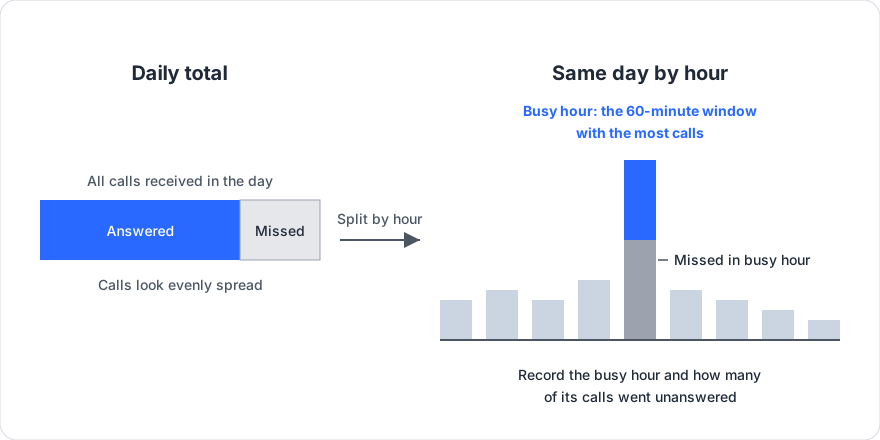
The table uses made-up round numbers for a line open 10:00 to 19:00, Monday to Saturday. It is an illustration, not customer data.
- Week: 280 received, 224 answered, 56 missed. The missed share is 56 ÷ 280 = 20%. A report of answered calls shows 224, which is 20% short of real demand.
- Per working day: 280 ÷ 6 = 47 calls (46.7 rounded).
- Day
- Monday
- Calls received
- 62
- Day
- Tuesday
- Calls received
- 48
- Day
- Wednesday
- Calls received
- 45
- Day
- Thursday
- Calls received
- 44
- Day
- Friday
- Calls received
- 51
- Day
- Saturday
- Calls received
- 30
- Day
- Sunday
- Calls received
- 0 (closed)
- Day
- Week
- Calls received
- 280
When a business line counts as having high call volume
Call volume is high when calls overlap faster than your people can answer them, and no single percentage above average defines that. A recorded message about a high volume of calls describes that overlap at that moment.
Offered load, measured in erlangs, is calls per hour times average handling time in hours. One erlang is one line or agent in continuous use for an hour; for staffing, think of it as one person busy for a full hour (Wikipedia, Erlang (unit)). At 30 calls an hour and 3-minute calls, that is 30 × 0.05 = 1.5 erlangs. The Erlang C queueing formula with a 20-second answer target gives two people about 39% of calls answered in time, three people 80% and four people 94%. It assumes callers wait and calls arrive at random.
For a flag of your own, after four weeks mark any day more than a quarter above its weekday median and check how much of it was missed. The quarter is a suggested starting point; adjust it once you see your pattern.
Terms mistaken for a count of calls received
Call volume is easily confused with calls handled, which counts only calls someone answered. A related term is the abandoned call, where the caller hangs up before anyone answers. See call abandonment rate and average call duration for the ratios built on volume.
How TalkEasy handles it
Our Sales Call Analytics reports total calls (incoming and outgoing), answer rate, missed calls, average talk time and peak calling hours, in daily and monthly reports you can download. Total calls covers both directions, so keep your received column to incoming calls. Confirm your busy hour against incoming calls in call history, and count the unanswered calls in that hour there.
Call recording and history, the analytics dashboard and unlimited users are on our Pro plan: ₹999 + GST a month with three hours of talktime a day, and extra talktime at ₹49 + GST an hour, as of November 2026. Missed Call Automation is designed to call customers back after a missed call. Our agent occupancy calculator shows occupancy for your own calls per hour and handling time.
To see how it reports on your line, Talk to Our Expert.
Example
On Monday a line receives 62 calls over 9 hours, 6.9 an hour. If 14 land between 11:00 and 12:00, the busy hour runs at 2.0 times the hourly average (14 ÷ 6.9), with a concentration factor of 23% (14 ÷ 62). If 6 of those 14 go unanswered, the busy-hour miss share is 43% (6 ÷ 14), which should be compared with Monday's own miss share.