Team Collaboration for Healthcare Teams Handling Every Patient call Together
Give your clinic team one shared workspace for routing, call history, ownership, and follow-up—without passing patients between personal phones.


 Trusted by 2500+ businesses
- Clinic Staff Shared Inbox
- Secure Internal Patient Notes
- Multi-Nurse Ring Groups
- 5000+
- Business Calls Managed Daily
- 24x7
- AI Call Handling
- 100%
- Business Call Tracking
- 1 Dashboard
- Complete Team Visibility
BUILT FOR HEALTHCARE TEAMS
One workspace for your whole practice's calls
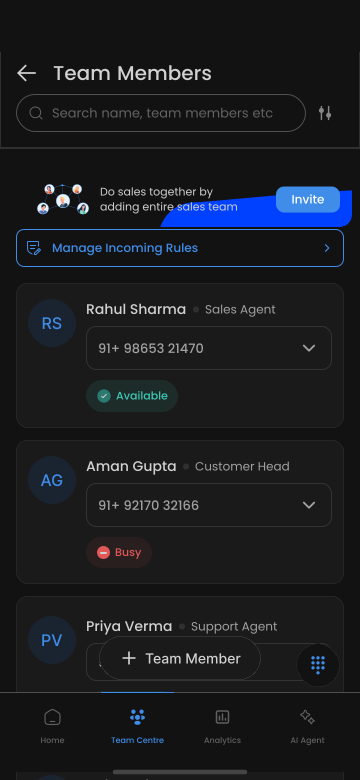
Beyond just sharing a number, TalkEasy gives your practice a shared inbox for patient calls, role-based permissions, and team-wide analytics for managers.
Why teams choose TalkEasy
What makes this different
Built around the way healthcare teams actually handle customer calls.
- 01
Shared inbox across front-desk and clinical staff
Relevant staff can see patient call history without needing a separate handoff conversation.
- 02
Role-based permissions by staff type
Control what front-desk staff, doctors, and admin can each see.
- 03
Team-wide analytics for practice managers
Get a consolidated view of call activity across your whole practice.
Practical ways to work better
TalkEasy helps Team Collaboration for Healthcare teams respond faster and stay organized.
Multi-staff patient coverage
Any relevant staff member can step in on a patient call with full context.
Practice manager oversight
Managers review team-wide call activity from one dashboard.
New staff onboarding
New staff get access to shared contacts and history immediately.
Benefits for your team
Turn every customer conversation into a clearer next step.
No information siloed with one staff member
Any relevant team member can step in with full context.
Clear role-based access control
Give appropriate access to front-desk, clinical, and admin staff.
Consolidated practice visibility
Managers see everything from one place.
Give your practice one shared view of every call
Set up team collaboration for your clinic.